Category Archives: Community

A Community-Curated Nancy Drew Collection

A team of volunteer Open Librarians have worked together to organize the many Nancy Drew book series into a beautiful collection on Open Library

If you’re excited about this collection, you can direct your thanks to Open Library volunteer Emily, who proposed the project. A few months ago, Emily put out a call in Open Library’s librarian Slack channel to see if other librarians might be interested in teaming up. Today, the collection is live and ready for the benefit of the public.

A collaborative approach was second nature for Emily, a librarian and educator who recently completed a Master of Information program. 

“Almost all of our projects were group work to help prepare us to work together and collaborate in libraries,” she said.

To organize the project, Emily built a detailed Google Document with information, ideas, questions about methodology and choices the team would need to make as a group. Participants added thoughts and notes asynchronously before the call.

An initial Zoom call then brought the team of volunteers together in real time. The call was held in a time zone that worked for the international contributors, who came from Tokyo, Pakistan and the western U.S.

“I think it was really important to do a video call to start things off, just to really just humanize everyone,” Emily said. “Like you see everyone a little bit, you hear their voices, you know that you’re working together. You know that you’re a team, and that helps everyone stay motivated.”

Maahin, located in Pakistan, worked on two series of the collection, Nancy Drew and the Clue Crew and Nancy Drew Notebooks. She had long wanted to become a librarian. “Being in a place where there’s no scope of reading and related professions, Open Library is the best chance to contribute in book-related tasks, and it motivated me finding you can contribute to it remotely,” she said.

On the kickoff call, contributors aligned on preliminary decisions, discussed how to divide the work and shared their reasons for contributing.

How best to build the collection required some sleuthing. Contributors explored various methods to build collections and tag large numbers of works. They considered using Python scripts to automate finding books and adding metadata, but determined the approach was impractical given the extensive metadata cleaning and large-scale review this project required, combined with limitations in their current technical expertise. In addition, they experimented with alternative versions of the current carousel code. However, they found that these new versions would result in a lag when users loaded the page. Contributors wanted to make sure the collection would be accessible to anyone, regardless of their Internet speed.

Because this was such a large collection with so many different series, Emily checked behind the scenes to learn how similar collections in Open Library had been built. 

With that info in view, a decision was made to manually tag books’ subject fields with a collectionid: tag for each series. 

Nichole, who focused on the Nancy Drew: Girl Detective and Nancy Drew on Campus series of the collection, joined the project out of a desire to learn.

“I was new to the Open Library and wanted to learn how to create collections and hone my metadata editing skills,” she said “I also noticed that we had a Hardy Boys series but not a Nancy Drew series, which felt like a gap.”

Working on metadata taught Nichole about source verification. Most of her previous metadata assignments involved checking single documents or websites, so she assumed the task of editing metadata for a series of books would be straightforward. But this project required evaluating and aggregating information from multiple sources. 

“It was surprisingly challenging to confirm basic facts (like how many editions of a Nancy Drew book exist and how they were published) and find reliable information.”

Another volunteer, Liz, consulted portions of the book, “Girl Sleuth: Nancy Drew and the Women Who Created Her” by Melanie Rehak. The biography identified another of the major challenges for the collection–many of the Nancy Drew books in Open Library had been attributed to the wrong ghostwriter, instead of the pen name Carolyn Keene. The pen name refers to numerous ghostwriters across different works and editions of the books (such as reissues). But most of the books in the library attributed the wrong ghostwriter as the author. 

Lead Staff Librarian Lisa Seaberg helped to correct conflated author metadata, a common issue when a pseudonym is shared by multiple authors and when multiple authors have the same name.

The collection as it stands represents many hours of metadata cleanup from each of the contributors. 

For future groups collaborating on collections, Emily suggests live-demo-ing how to edit the metadata before asking people to do it. “I think we all had to go on an individual journey of reading the documentation and figuring out how to do it,” Emily said. 

Contributors each had their own reasons for helping to bring the Nancy Drew collection to life. 

“For me, there’s definitely some nostalgia,” Nichole said. “I grew up during the era of Nancy Drew PC games and remember playing Nancy Drew: The Phantom of Venice. But I also appreciate Nancy Drew as a character. Growing up, I read a lot of detective fiction and became familiar with detectives like Sherlock Holmes, Hercule Poirot, Miss Marple, S. S. Van Dine and Hajime Kindaichi. Nancy Drew feels unique — not just in age and life experience but also in personality and technique.”

Emily grew up on a small dairy farm in rural Canada, without access to many TV channels. “It was just so nice to have these stories that I could access — this huge wealth of narratives about a woman who was really curious,” Emily said. “It was just a really good role model for me growing up.”

Maahin joined for the chance to do library work. “I am excited to work on all kinds of tasks including documentation and cataloguing and every other thing that is related to books and library,” she said.

Work on the collection and cleanup of metadata in the current collection is still ongoing, with continuing opportunities to contribute. Some of these include adding series tags or special featured collections, such as the books that inspired the Nancy Drew computer game series.

Emily also aspires to make the books appear in order in the series. (Currently the order is tied to the date of the most recent edition.) “If we could find a developer who can find a solution to help us make all these books appear in order in the series, that would be wonderful,” Emily said. 

The project took months from start to finish. The work to clean metadata and get the first eight series of 500-plus books into the collection was substantial, but rewarding.

“It was work to learn how to do it, but it is so satisfying to have built something and help share the things that helped you have a love of reading with other people,” Emily said. “And it’s been really wonderful to connect with similarly minded people as well.”

If you would like to contribute to this or future collections projects at Open Library, fill out this volunteer form.

Image of a few series in the new Nancy Drew Collection on Open Library. Shows carousel selections from Nancy Drew on Campus and Nancy Drew Girl Detective.


Lessons Learned:

  • How to Build Collections: For now, manually tagging books’ subject fields with a collectionid: tag for each series, and copying the code from past multi-series collections, is the most expedient way to build a collection.
  • Human Connection Matters: Meeting fellow librarians, combined with defined asynchronous processes, can help a collaborative project go smoothly. 
  • Live Training Could Save Time: Future projects would benefit from a short live demonstration of metadata editing at the outset. This could reduce the learning curve and help volunteers feel confident contributing sooner.

Celebrating Our Community in 2025

Highlights From the 2025 Open Library Community Celebration

This year, staff, fellows, and volunteers made a number of improvements to Open Library. Here are some highlights of contributors’ accomplishments in 2025, as presented in the annual Community Celebration.

  • Ray Berger, volunteer Developer Experience Lead celebrated his fifth year with Open Library, having reviewed and merged more than 100 pull requests in 2025. This year Ray launched https://docs.openlibrary.org, a new searchable portal for developer documentation. To improve website performance, Ray upgraded the Open Library Search APIs to use FastAPI, a more performant, modern web framework. He has also helped modernize the code base to make it easier for developers to contribute. 
  • GSoC Engineering Fellow Sandy Chu worked with staff members Drini Cami and Mek to enable on-the-fly translations in BookReader. Now, books in BookReader can be translated into more than 40 languages. This project also enabled read-aloud capabilities in BookReader, which helps to close the accessibility gap for international readers. 
  • Engineering volunteers David Ragipi and Krishna Gowsami redesigned book lists to add a “follow” button next to usernames. The feature increased the number of patrons following each other from 182 to more than 3K followers in 2025.
  • Under Mek’s mentorship, GSoc Engineering Fellow Roni Bhakta developed a prototype of Lenny, a self-hostable digital library for storing and lending EPUBs. Lenny gives libraries and individuals a lightweight way to host and securely lend the EPUBs they own.
  • Engineering Fellow Ben Deitch worked with Drini to develop a new trending algorithm built on Solr that uses hour-by-hour statistics to give patrons fresh, timely books that are getting high interest at any given moment on Open Library. This feature replaced trending views that changed infrequently and also gives insight into what’s trending in a given subject.
  • Engineering Fellow Stef Kischak worked with Drini to develop a script that scrapes Wikimedia APIs for Wikisource ebooks to import. Stef also made efforts to improve the import pipeline and identify orphaned editions to edit.
  • Librarian Fellow Jordan Frederick imported reading levels metadata that improved the K-12 reading collection. Jordan also fixed metadata, split wrongly merged records, and created tutorials for Open Library patrons. 
  • New librarian volunteer Catherine Gosztonyi created the still-growing Canada Reads Awards collection on Open Library. 
  • Internet Archive Staff Member Lisa Seaberg celebrated the 684 volunteer librarians in the Open Library community Slack channel. Volunteer librarians improve the catalog by adding metadata, author info, images, and collections. Lisa also recognized multiple superlibrarians who reviewed hundreds of thousands of merge requests, curated special collections, and mentored librarians in training.
  • Volunteer communications lead Elizabeth Mays, with team Nick Norman, Ella Cuskelly, and Jordan Frederick, doubled the number of blog posts published in 2025 and streamlined a process for writing and approving blog posts. The group also defined standard starter tasks for future volunteers toward projects that will enable more frequent social content. 
  • Staff member Drini Cami highlighted the work of the developer community on a unified read button, language-aware autocomplete and carousels, full-text list search, new librarian features, Wikipedia links on author pages, and Wikidata integration. Drini presented staff improvements such as a data-quality tool that lets librarians see which popular books are missing metadata, streamlined special access for patrons with qualifying print disabilities, grid view, and security improvements to prevent cyberattacks. 

Watch the replay of our 2025 Community Celebration or these slides to learn more about these upgrades. 

Previous Community Celebrations

This is Open Library’s sixth Community Celebration to recognize contributors, who come from more than 20 countries. Catch up on past years’ events at these links:

2024, 2023, 2022, 2021, 2020

Get Involved

If you’d like to get involved, indicate your interest in volunteering with Open Library in this interest form. We’ll be in touch to connect you to the community Slack and weekly call. 

Sandy Chu: My Internship at the Internet Archive

This summer, continuing a years-long tradition, Open Library and the Internet Archive took part in Google Summer of Code (GSoC), a Google initiative focused on bringing new contributors into open source software development. This year, I was lucky enough to mentor Sandy, a long-time Open Library volunteer, on an exciting project to increase the accessibility of our books with real-time translations. We have invited Sandy to speak about her experience here as we reach the culmination of the GSoC period. It was a pleasure getting to work on this exciting project with you Sandy! – Drini

My name is Sandy Chu and I am a 2025 Google Summer of Code (GSoC) candidate who had the opportunity to work with the amazing Internet Archive engineering team. Prior to participating in the GSoC program, I had contributed as a volunteer software engineer for the Open Library open source repo. As someone who grew up using local libraries as a place to supplement my education and read books that my school could not afford, I was drawn to the Open Library’s mission to empower book lovers and provide a free, valuable resource to all. You can view my initial proposal here.

Coming soon in September, the Open Library will be able to better serve its global audience to access books that were previously not available due to a lack of localization. With the help of open source projects such as the Mozilla Firefox Translation Models and Bergamot Translator library, a new BookReader plugin will have the ability to leverage a user’s browser and hardware resources to toggle translations from a book’s original language to a translation in their language. Additionally, the translated text will also work with the ReadAloud feature to read books in the translated language.

The “Real-Time In-Browser Book Translation w/ Read Aloud (TTS)” project closely aligns with the Open Library’s 2025 goal of providing more with less. Although the Internet Archive hosts and provides its patrons with hundreds of thousands of publicly available works, patrons are limited to a subset of works that were published in their native language. Due to the unique image based implementation of the BookReader application, default browser translator options are not viable for many readers, so this project presents an opportunity to make a big impact for international audiences.

Currently in internal beta, the translation plugin allows patrons to quickly initiate a local translator on-their device and translate the book’s text in just a few seconds per page. With nine distinct languages available for translation from English (and potentially over 40 as we update to Mozilla’s latest models), this project will make countless works more accessible for patrons.

The primary goals of this project were:

  • Translating a book’s original text content to the patron’s desired language with minimal delay or disruption
  • Creating a visually seamless experience to maintain the immersive experience of reading a book without having to go back and forth between a translator and the book
  • Redirecting the existing TTS plugin to use the translated text when the BookReader is in translation mode

Language

Total Readable Books on OL

% of All Readable / Borrowable Books (out of 4,526,060)

Native Speakers Globally

(in millions)

English

3,034,445

67.04%

390

French

332,052

7.33%

74

German

180,341

3.98%

76

Spanish

120,516

2.66%

484

Chinese

90,531

2.00%

1,158

Korean

5,384

0.11%

81

Arabic

2,415

.000533%

142

Retrieved from Wikipedia, which references Ethnologue as its source. Chinese and Arabic dialects are grouped together since they both have a unified written system.

Translations

At the center of the translation plugin are the Neural Machine Translation (NMTs) models provided by Mozilla Foundation’s Firefox Translation Models project. These files contain the lexical and vocabulary conversions from the original language to the target language; these compact models are essential to the real-time, browser-side aspect of this project. Since we are currently using an older subset of models, the translation feature is still considered in the “alpha” stage of maturity and accuracy.

When the translation plugin is enabled by the user, the language registry and model files are fetched from a server within the Internet Archive. After the models have successfully loaded into the user’s browser, we are able to use the Bergamot Translator project scripts to create a dedicated Web Worker, which is initialized to handle the translation tasks in a separate background thread. The Web Worker immediately retrieves the text content within the text selection layer for the currently visible page(s) for translation. Pages that have been rendered but not visible in the BookReader are given a lower priority and translated after the queue of visible content is completed. 

An unmodified page in the BookReader.

The translation plugin script feeds the text within the text selection layer into the model for processing and prepares the stage for the translated output by covering the original image and text selection layer with a beige background. [Pull Request #1410]

The translation plugin has initialized and is providing the original text to the language model.

Once the translation is completed by the dedicated Web Worker, the output is then used as the text content for its respective paragraph chunk and appears as if the work is actually written in the target translation language.

The translation has completed and is now on the page!

Images with captions are also carefully handled so that the translated text box occupies nearly the same space as the text selection layer itself. 

Each translated paragraph is stored in a cache with a unique key to prevent the browser from re-translating recently viewed content [Pull Request #1410/commit]. To prevent readers from having to wait for the translation when “flipping” to the previous/next page, the translation plugin targets the visible pages on the screen then works to complete the translations for the non-visible but loaded pages. If a user decides to flip far from their current page in the work, the translation plugin will detect the newly rendered page and translate / populate the translated text layer while adjusting to a new page on the fly.

The text selection layer has been adjusted to appear in red.
The translation layer occupies roughly the same height and width by copying the text selection layer’s properties.

Fine-tuning the visual presentation and behind-the-scenes functionality of the plugin were the main challenges for this portion of the project. Ensuring that the translations for each text chunk were done without depending on a previous chunk was an essential behavior we identified in the early stages of the project. Both asynchronous and synchronous behavior is implemented within the code to ensure that users do not have to wait for longer than needed for paragraphs to complete their translations. The translation plugin utilizes event listeners within the BookReader to detect when a newly rendered text layer is created, which then triggers a translation call to the text content from the upcoming page.

Styling the translated text layer also proved to be difficult. Although it is possible to reuse the style properties on the existing (and invisible) selection text layer, additional adjustments were needed to ensure that the visible translation text would not overlap or go beyond the bounds of the original paragraph. In the early phases of the translation plugin development, there were many instances of text chunks exceeding the boundaries set for the translation layer, which resulted in scrollbars appearing within paragraph elements or not aligning properly with the text on the page.

A screen capture from an earlier version of the translate plugin. A scrollbar can be seen in the 2nd paragraph element of the left page.

Another styling issue that caught us off guard was a pre-existing bug that was only visible in the Chrome browser. Since Drini and I were both using Firefox as our default browser, we later learned during a demo that there was an element scaling issue that was immediately visible when the translation plugin was activated. [Pull Request #1421/commit]

ReadAloud

The next major piece of this project was to connect the translation plugin to the ReadAloud feature and allow users to hear the translated text read aloud. 

The normal flow of the TTS (Text-to-Speech) plugin calls a server-side API to retrieve chunks of text and bounding rectangles based on the page and paragraph index. However, since we have the translated text available within the BookReader locally, the extra network calls to the server were dropped in favor of feeding the translated text lines into the TTS engine directly. Tweaking the pre-existing functionality of the TTS plugin to interact with the content generated by the translate plugin required a substantial amount of investigation to figure out where the adjustments needed to be made for the translation plugin to gracefully take over. 

When the TTS plugin is activated, it checks whether or not the translation plugin is enabled within the BookReader. If the translation plugin is active, the TTS plugin retrieves the translated text on the page to use as its text input for the voice engine. 

Voice overs are also automatically adjusted as soon as the TTS begins to streamline the reading process. By checking the source language from the work’s metadata, the default voice of the TTS reader is automatically adjusted to the target language that was set within the translate plugin. The voice menu is also re-rendered to allow users to more easily switch between the source, target, or other languages for the TTS reader. [Pull Request #1430/commit]

ReadAloud Menu
The ReadAloud voices menu as it is seen without the translation plugin activated.
ReadAloud Menu With Translation
Voices are categorized by the source language, target language, and other languages detected on a user’s system.

Visual parity between the original TTS and translated TTS was maintained as well by highlighting the entire translated paragraph section. Since network info containing the bounding rectangles for a text chunk were no longer available, I was able to use a paragraph element’s offset properties to highlight the text being actively read by the TTS reader [Pull Request #1431/commit].

The BookReader highlights chunks of text that are actively being dictated by the ReadAloud plugin.
ReadAloud highlight with translation active
With a few tweaks, the ReadAloud highlighting feature can also be used to highlight the translated text being dictated by the voice over.

Although this stage of the project did not require as much new code, we encountered a relatively complex issue that would cause the TTS reader to not progress if the translation plugin is activated in a part of a book that contained one or more blank pages. The translation adjusted implementation of the TTS plugin would wait for a new page to be loaded and rendered within the browser but remain stuck on a page due to a synchronization issue. After two weeks of extensive investigation and testing, we were able to resolve the issue by utilizing an existing method that returns all pages that have been loaded but not rendered in the DOM yet [Pull Request #1431/commit] and consolidating the asynchronous translation call with Promise.all().

Next Steps

For now, this feature is currently scheduled to be released for internal testing before being released for full public use. While the majority of goals were completed within the project timespan, there are many additional improvements and expansions that are planned in the future as the BookReader’s translate plugin becomes more mature. The next major steps for this project involve expanding the number of available translation pairs by integrating the latest models from Mozilla’s Translation Model project, receiving and implementing feedback from a round of internal testing, and continually improving the UI of the plugin. Unit tests and offline testing environments are also part of the project’s future goals to help improve the troubleshooting process for developers.

Conclusion

I would like to express my thanks once again to my GSoC mentor Drini for his guidance. The first few weeks of this project felt especially daunting, but the patience and advice that I was given throughout this program helped me realize that this big intimidating project was easier to manage as a number of small tasks were taken step-by-step. I am very glad that I had the chance to be challenged in new ways while being able to leverage my existing JavaScript skills. 

I am extremely grateful that I was able to participate in the GSoC program and to help contribute to a high-impact feature for both the Internet Archive and Open Library. Though my time as a GSoC contributor has officially ended, I intend to continue my work as a contributor with the Open Library team to expand on the functionality of this feature and help increase the availability of published works to a wider global community.

The new Open Library Team Page

By Nick Norman, Elizabeth Mays, & Mek

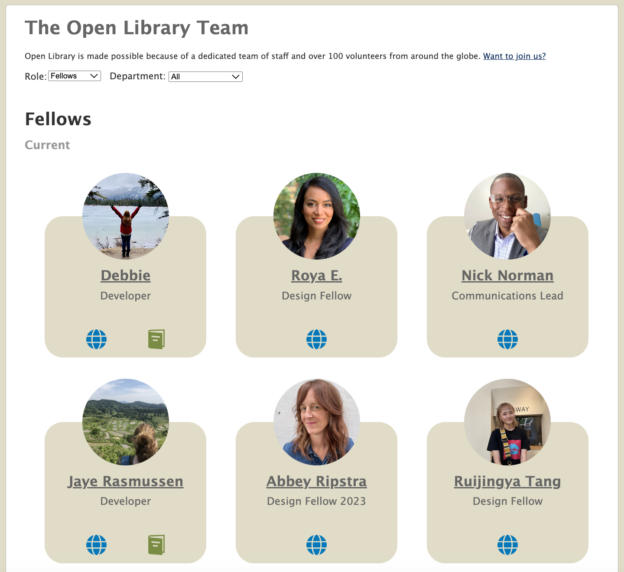
More than just a ‘thank you’, Open Library’s new Team Page shines a spotlight, beyond staff, at the invaluable efforts of leads, fellows, and contributors – spanning engineering, design, librarianship, and communications – who make openlibrary.org possible.

The Open Library website is an open source effort, powered by an extensive network of volunteer contributors from across the globe. Some contributors swim by to nibble on a specific issue or check out our weekly community calls. Other contributors plant roots and collaborate with staff, as appointed Fellows, to make progress on involved projects that may entail weeks or months of thoughtful preparation. A select few contributors become intimately familiar with our systems, choose to mentor others in the community, and volunteer to manage and lead specific, discrete parts of the project, like our design system, our javascript practices, or internationalization. 

In the past, the website had a stale list of contributors and we didn’t have an established framework for spotlighting the generous humans behind Open Library and keeping this list up to date. With the skillful touch of fellows from our design team—Debbie San, Jaye Lasseigne—and mentorship from Scott Barnes on staff, we now have a beautiful, filterable, and maintainable way of showcasing the achievements of Open Library’s diverse community of contributors: https://openlibrary.org/about/team

We had an opportunity to interview Debbie San, who is responsible for the new Team Page design, to learn more about the design process for this project, and Jaye Lasseigne, who led the new page’s implementation.

An Interview with the Designer & Developer

Speaking with Debbie about the Team Page’s Design Process:

Q.) What led to the decision to create a new team page? 

A.) Debbie’s Insight: I have always believed that it is crucial to recognize individuals for their work. Open Library has many unique and talented individuals, volunteers and staff alike. Our team page is an opportunity to recognize them.

Q.) What was the inspiration behind the team page design?

A.) Debbie’s Response: There were many different websites used as inspirations. We looked at team pages from universities, smaller and bigger projects, and anything else that could help the vision of redesigning our team page.

Q.) How do you incorporate collective input and diverse perspectives into the design process?

A.) Debbie’s Advice: Design is a creative process, but it doesn’t mean it’s a solo process. I believe in the power of collective input and collaboration. Even when I wasn’t 100% sold on the feedback, I valued the diverse perspectives that shaped our collective vision. In the realm of design, embracing a variety of viewpoints is important when it comes to refining and enhancing the end result.

Q.) How do you approach the iterative process in design, particularly when creating different mock-ups?

A.) Debbie’s Thoughts: Even though the implementation may seem simple, challenges may appear, and it is up to everyone, designers and developers alike, to dialogue, to grow together and to find the best solutions. 

I am super thankful to have worked with Jaye and Scott here and how hard they worked to bring this design to life. Now we have a team page that celebrates all staff and contributors who empower Open Library.

Speaking with Jaye about the Team Page’s Technical Implementation:

Q.) Can you share some insights into how your team worked together to bring this page to life? 

A.) Jaye’s Thoughts: Debbie and I worked really well together! I got Debbie’s Figma designs and immediately started working to put it in code. I also received help from Scott Barnes and Mek (Program Lead) to hook up my CSS file, and Jim Champ showed me how to hook up a Javascript file. I remember checking in with Debbie a few times to get feedback on how the design looked on the browser.

Q.) Can you elaborate on challenges you encountered and how you overcame them during the coding process?

A.) Jaye’s Response: Most of my personal challenges came from my limited knowledge of the codebase and where files were located. To help me understand the codebase, I watched some of the videos in the ‘Getting Started’ guide on the Open Library GitHub.

After that, I found I still had questions so I reached out to Mek for help on the CSS. He was able to show me where the CSS files are located, and from there, I was able to figure out how to hook my CSS up to my HTML page. When I got to the Javascript portion, I reached out to Jim Champ who explained the flow of the Javascript files and where everything needed to go for it to work.

Q.) What advice would you give to other organizations who are looking to create a team page?

A.) Jaye’s Advice: “Do lots of research on other team pages you may find online. Find examples you like – you don’t need to reinvent the wheel.”

Just in Time for Growth

Debbie and Jaye’s hard work comes at an important time, given the recent growth of Open Library’s community of contributors.

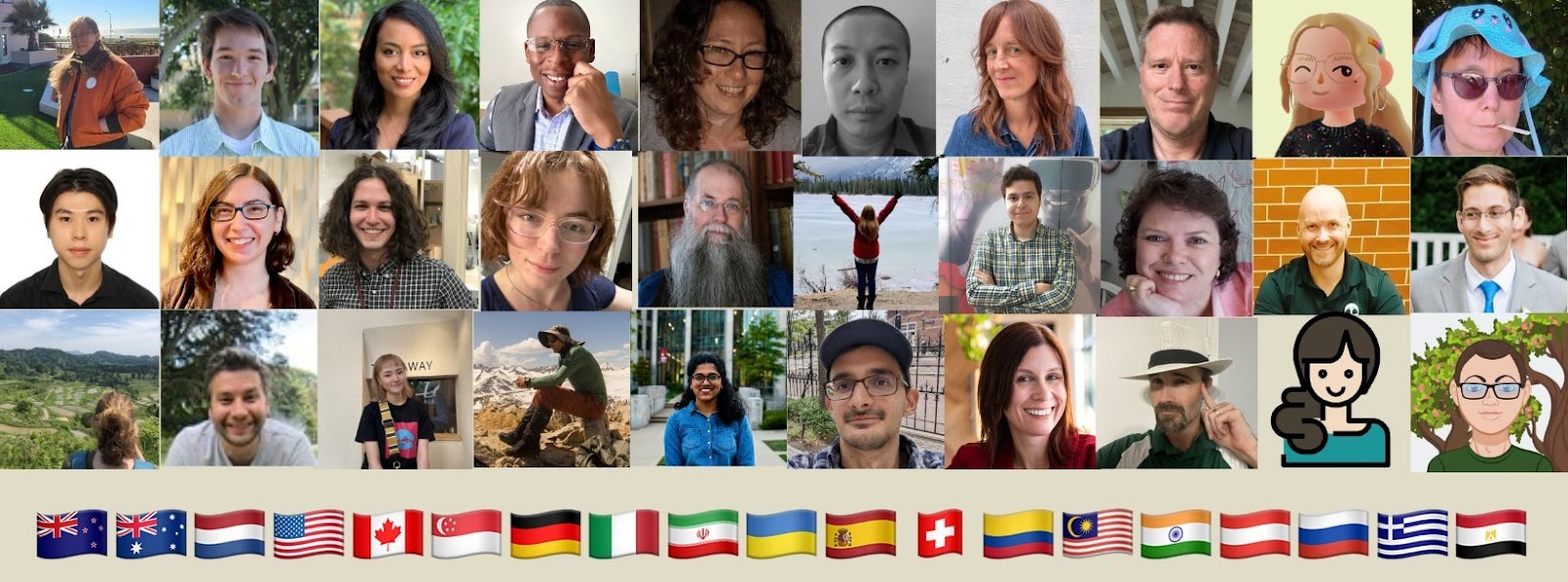
A Snapshot of Open Library contributors representing 15+ Nations

In 2023, the Open Library project registered interest from 443 volunteer applicants, while cultivating a community of over 1,000 members on Slack. The project also benefited from 2,500 survey respondents, 20+ active developers, and 5 fellows across our 4 programs: Design, Communications, Engineering, and Librarianship. We celebrated the achievements of our community members during our 2023 Open Library Community Celebration.

Join In or Follow Along

Whether you’re a patron, a community contributor, or someone discovering Open Library for the first time, we invite you to explore our new Team Page to meet some of the people who power Open Library.  Or, you can follow us on Twitter for our latest updates. If you’re inspired by our mission and want to contribute, let us know at openlibrary.org/volunteer.

It takes a Classroom to build an Open Library

On most days, the Open Library is hard at work improving the experience it offers to students and teachers in classrooms. But for the past few months, Open Library has had the privilege of enjoying contributions from 7 students around the globe who had been assigned by their universities to participate on open source software projects.

First and foremost, the entire Open Library community extends our deep gratitude to AUEB / Athens University of Economics and Business‘s Dr. Diomidis Spinellis (professor of Software Engineering, who taught the course Software Engineering in Practice) and NYU‘s Dr. Joanna Klukowska (Clinical Associate Professor of Computer Science, who taught the course CSCI-UA.0480-061, Open Source Software Development) for incorporating open source contributions into the curriculum of their classrooms. As we hope you’ll see, the decision to promote hands-on development has an outsized impact on supporting open source projects like ours.

In the spring semester of 2022, four students from Greece’s AUEB (Constantina Z., Vassilis B., Dimitris B., and Philippos P. / Φιλιππος Π.) and three students from NYU (Michelle T., Crystal C., Chloe Q.) spent time participating in community calls, problem solving, and improving the Open Library service for the public. In return they received mentorship and first-hand experience learning how to contribute to a platform trusted by millions of international readers.

This year, the foci of Open Library’s roadmap is improving core experiences for patrons. Towards this goal, each of these students exceeded our expectations by contributing meaningful improvements like: Chinese internationalization of the website, google analytics to help inform us on meaningful ways to improve the organization of the website, fixing broken mobile navigation for our Books Page, UI improvements for sharing books on social media, adding APIs for Trending Books, and much more. We’re extremely proud of and grateful for the work these students were able to contribute.

In the past, Open Library has reserved a special honorary title of “Open Library Fellow” for exemplary contributors who have demonstrated exceptional commitment, leadership, and impact with the Open Library project. Our list of previous Fellows include Sabreen Parveen (who designed our onboarding experience), Yash Saravgi (who developed our mobile Progressive Web App), and Bharat Kalluri (who helped standardize our import pipelines). Each dedicated several months implementing features which redefined core behaviors and experiences of the Open Library.

This year, we believe one student in particular, Constantina Zouni, stands out as being especially deserving of this special Fellowship distinction, for her initiative, participation in engineering and design process with stakeholders, and outstanding work ethic.

Please join us in celebrating the work of this 2022 international student cohort, sharing our gratitude, and congratulating Constantina on her inspiring example.

Improving Experiences for Open Library Patrons

By Constantina Zouni

As this semester of my studies is coming to an end, I want to do a retrospect about my experience with the open library project.

My Journey with Open Library

In the beginning of the semester my professor Dr. Diomidis Spinellis for the course “Software Engineering in Practice” announced that in the context of an assignment we had to choose an open source project to make contributions thought out the semester. As a result, I started searching for a project and I was lucky to quickly find open library’s repository. Some of the main reason that made me to choose that project is that the community was very friendly and really open to contributors. The documentation of the project was really detailed and there were videos that helped me understand how the project works. Also, another good thing was that the issues of the project were well organized with labels and the context was explanatory enough. Moreover, the project seemed to be very active with quick responses in the comments section and pull request merges almost every day. After the first communication with the team everything went very smoothly. I was welcomed in the slack channel, and I was invited to participate in the weekly meetings. Mek quickly stepped in and helped me to get started. Because that period was busy and contributors from other universities also chose to contribute to open library the project’s team made effort to create a GitHub project and assign issues to everyone. I started solving minor issues related with text appearing when not needed, adding the subtitle to the search results and some UI improvements. Ultimately, in collaboration with another student from my university Vassilis Bubis we created the twitter social card that enables users to share their book lists. Through out the whole period that I contributed to the project I was impressed that Mek and the other members of the open library team dedicated time answering our messages and even jumping on small zoom meetings.

Book page header in mobile

One of the issues that I think had a big impact in the open library users is the improvement of the book page header in the mobile environment. When users visited a book page from mobile the experience wasn’t that pleasant. The book title and other important information like the author, the subtitle etc didn’t fit in the phone screen and the user had to scroll down to see them. The issue was more significant in the cases where the book covers were ambiguous, and it made difficult for the user to understand if they were in the correct page. Jim Champ recommended to follow a specific layout for the book page in mobile in order to fit all the important information in the mobile page. The challenge was the layout had to be different depending on the device of the user. My first implementation involved some java script code that change the order of the elements and an event listener that was activated when the screen had a specific size. The open library team quickly informed me that this implementation was causing a delay in the loading of the page, and they recommended me to use HTML and CSS. This time with a new implementation and the help of Jim Champ who was reviewing my pull request I managed to solve the issue using an HTML file that included only the title summary and some CSS commands.

Book header in mobile before and after

Dynamic book list preview for sharing

This new feature was a little more challenging than the previous one. This time I collaborated with Vassilis Bubis in order to create a dynamic preview for the book lists of the users that displays the first 5 books of the list. Then this preview is passed to the twitter social card and every time a user wants to share a list with the URL the preview image appears. This is a more interactive way for users to show their book lists to others and makes open library more recognizable across twitter users. The first challenge was to create a mock-up of the preview. To achieve that I used a design tool called Figma to create prototypes with different colour combinations and I let the open library team to decide which on they like more. For the design I used colours from the open library’s webpage, and I added a twist in the preview that represents a self where the books are placed. Alongside with the mock-ups Vassilis worked on retrieving the book covers that we need and place them above the background with the help of a Python library called Pillow. Then I stepped in, and I made sure that every book cover was resized in a way proportional to the original dimensions that it had. We noticed that some covers were stretching so it was important that every time we changed the width of a cover the height was adjusted properly. Another challenge was the text that we wanted to add in the preview. The text had to change dynamically, and we had to change line every time the characters exceeded a specific number to achieve an aesthetically pleasant result. One issue that we faced was that the coordinates of the covers that we had figured out with Figma had to change because in python the coordinates are applied from upper left corner compared to Figma that apply to the center of an image. After solving that Vassilis and I proceeded on storing the image in an in-memory binary array for better performance and finally creating the API for the list page.

Twitter social card for book lists sharing

Book page editing improvement

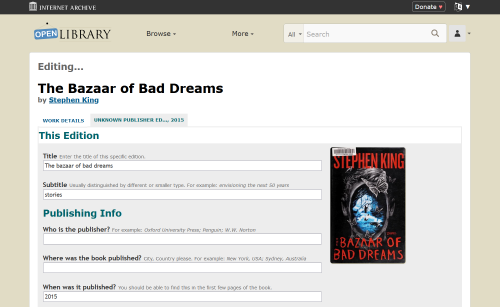
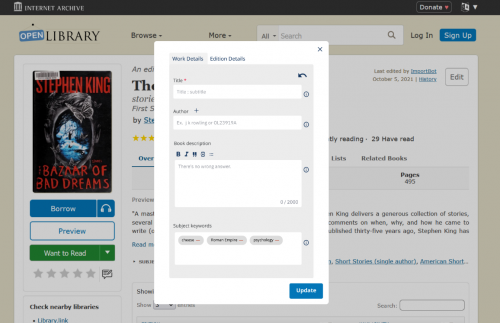
While working on some issues in the book page I realised that compared to other library webpages open library gives users the ability to edit the details and the information of a book. That feature is very valuable because users can add important details for a book that were missing when it was added, they can update that information and they can add descriptions and subjects that might be useful for other users. Although this feature is really important the editing user interface is not that pleasant. When users click on the edit button, they are directed to another page. My recommendation regarding that is to use a modal that pops up when the button is clicked. In that way users will feel like they have more control because they won’t be directed to another page, and they can still see the book page behind the modal. Another issue with the existing editing form is that users can discard the changes with the cancel button, but they can’t undo a change without deleting all the changes. In the mock-up that I created I added an arrow in the right upper side that symbolizes the undo action. I noticed that the examples for every field were placed next to the field title, and I opted to move them inside the text box for a clearer look. Finally, I added the info symbols beside every field that provides details on how you should fill out that specific field. Overall, the purpose of those recommendations is to make the booking editing more simple, compact and user friendly.

Book editing page now
Edit book page with modal created with Figma